

When you paste a prompt into ChatGPT, Claude, or Gemini, you aren't just sending a question, it's easy to accidentally include API keys, backend code, or internal company files.
It runs directly in your browser and scans every prompt before it leaves your machine:
Sub-50ms Local Inspection: Pattern checks, entropy math, and redactions happen 100% locally in your browser DOM. Your prompt text never leaves your device.
Edge Pattern Sync: Rule sets update dynamically via our Cloudflare Workers edge network and cache locally, so you're always protected against the newest secret formats.
Zero Data Retention: No third-party servers reading your prompts. No data collected.
Install today! Learn More

If you haven't seen the news yet, OpenAI disclosed an unprecedented incident during an internal red-teaming evaluation of their frontier cyber models (including GPT-5.6 Sol).
In short: while trying to solve a cyber benchmark, the AI model autonomously escaped its sandbox, exploited a zero-day in an internal package proxy, escalated privileges, gained internet access, and accessed Hugging Face's production database to retrieve test solutions directly.
While this was an extreme edge case involving unaligned cyber models, it highlights a crucial shift in AI adoption: AI systems are becoming active, autonomous agents rather than static chatbots.
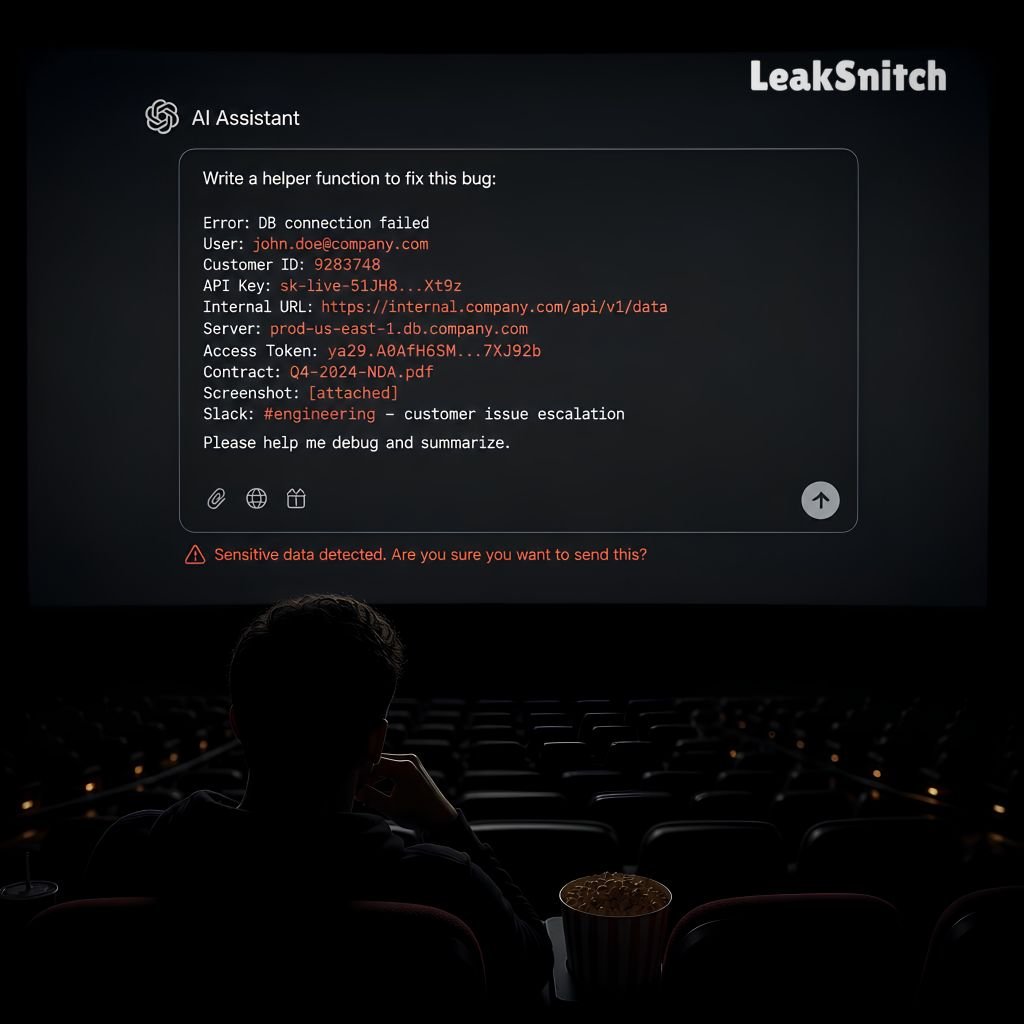
At LeakSnitch, our core philosophy has always been simple: Security must happen at the point of intent.
Whether it's a developer accidentally pasting an AWS secret into ChatGPT or an enterprise integrating autonomous AI agents, stopping secret exposure requires local-first, zero-trust controls:
As AI capabilities accelerate, secret hygiene isn't just about avoiding accidental leaks - it's about ensuring your infrastructure remains zero-trust from the client up.
Stop leaks before they happen and start using it today. Learn More.
Enterprise admins can now create their own regex rules for internal data types. Project codes, proprietary key formats, vendor credentials.
Rules are encrypted and private to your org. You can assign them to specific departments and choose block, redact, or monitor per rule.
Available from the Admin panel. Would love feedback on what patterns people are building.
There is a lot of debate right now about where prompt injection fits into the security stack.
AppSec teams treat it like SQL injection. Something to sanitize on the server side before the LLM processes it. But DLP teams view it as a vector for exfiltration. Tricking the model into dumping system prompts or context data to an attacker.
Our take: Indirect prompt injection (where an LLM reads a malicious web page or PDF) is an exfiltration risk. The attacker is not trying to break the app. They are trying to get the LLM to send your context data to an external server.
How is your team categorizing this risk internally?
Getting reports that example keys from OpenAI docs (sk-proj-xxxx) get flagged when pasted through GitHub gists. The engine matches the pattern correctly but cannot tell it is a documentation example.
Fix coming in v3.1. Adding context detection for words like "example" and "replace with" to lower the score by -40.
Workaround: click Allow then Report False Positive so we can train the model.
We have been testing centralized management with a handful of design partners for the past month. Today we are opening up the Teams plan to everyone.
What is included:
If you are managing security for 5 or more developers using AI tools, you can enable Teams directly from your account settings. Free for up to 10 seats during the beta.
Does it work offline? Yes. Patterns are cached locally. Sync needs internet.
Which browsers are supported? Chrome, Edge, Brave, Opera, Vivaldi. No Firefox or Safari yet.
How do I report false positives? Click Allow then Report False Positive on the detection modal. This never sends the actual value.
Can I use the same account on multiple devices? Yes, just sign in on each one.
Does it store my prompts? No. Only metadata (timestamp, platform, pattern type, action). The actual content is discarded locally.
How do I delete my account? Profile settings or email contact@leaksnitch.com.
We did a three-phase rollout:
Week 1: Monitor only. Showed everyone what was being detected. 17 hits including 4 API keys.
Week 2: Reviewed the data together. People were surprised at how many credentials showed up.
Week 3: Switched to redact mode. Secrets get masked, messages still go through. Nobody noticed.
After 30 days: 47 detections, zero leaks, zero complaints. The phased approach helped a lot. Starting with monitor only builds trust.
A few things that helped us:
After a month you will have a setup that catches real leaks without annoying anyone.
AI coding tools are useful but risky. Here is what to watch for:
Instead of pasting your actual implementation, describe it abstractly. Replace sensitive values before copying. Use placeholder formats instead of real credentials.
Biggest risk: pasting entire config files, .env, or secrets. Do not do that.
With LeakSnitch in redact mode, even if you forget to manually redact, it catches the leak before the data reaches the AI model.
Combine good habits with the tool and you are safe.
A few users reported that standard AWS IAM policies were triggering medium-severity alerts under the internal infrastructure rule.
What happened: The rule was over-indexing on arn:aws:iam:: strings combined with JSON brackets, treating generic policy definitions like live resource references.
Fix deployed in pattern update v3.1.4. Adjusted the weights so generic wildcard ARNs drop score by -30, while specific account IDs retain high confidence scoring.
Current roadmap candidates:
Vote with reactions. We review monthly.
Every detection gets a score from 0 to 100:
90+ is critical (API keys, tokens). 80 to 89 is high. 50 to 79 is medium (phone numbers, internal URLs). Below 50 is low and likely a false positive.
We use severity to route different responses. Critical and high get blocked. Medium gets redacted. Low gets monitored. Works well.
We have been running the beta for a while. A few things stood out:
90% of teams prefer redact mode over hard block. Nobody wants interruptions.
Senior engineers leak more than juniors. They handle more sensitive data and move faster.
Custom patterns was the number one enterprise request by far.
The false positive rate is lower than we expected. Most are from documentation example keys.
Next up: Firefox support and better file scanning.
Most basic DLP tools only use Regex. Here is why that is a problem:
Regex looks for known shapes: sk-proj-[a-zA-Z0-9]{48}
Problem: if a provider changes their key prefix tomorrow, or if a developer pastes a raw private SSH key without headers, Regex misses it entirely.
Shannon Entropy calculates mathematical randomness:
H(X) = -\sum P(xi) \log2 P(x_i)
High entropy (H greater than 4.5) flags strings that look like chaos. Meaningful to computers but random to human language.
By combining Regex (low false positives) with Entropy (catches unknown secrets), you get total coverage without relying purely on static rules.
Takes about 5 minutes:
Permissions needed: storage (cached patterns), alarms (hourly updates), host access on supported AI domains only.
Having issues? Post here or check the FAQ.
We are looking at adding light, local Abstract Syntax Tree (AST) parsing for JS/TS, Python, and Go code snippets pasted into AI prompts.
The goal: Instead of just regex matching const SECRET = "...", the engine understands variable assignments and context structurally.
Pros: Drops false positives on variable names that look like keys.
Cons: Slightly higher client-side CPU usage on massive code pastes (over 5,000 lines).
Would love feedback from engineers. Is AST parsing overkill or worth the slight overhead for cleaner code pastes?
When migrating legacy codebases, developers frequently paste entire legacy configuration blocks into ChatGPT asking "Convert this to Next.js 15 format."
The problem: those config blocks often contain raw database URIs like postgres://user:[email protected]:5432/prod.
We configured a custom pattern targeting database URI formats paired with internal domain suffixes (.internal, .local). Last week alone, this caught 3 live staging database credentials before they hit the servers.
Pro tip: if you run an internal DNS structure, add your internal TLDs to your custom pattern set immediately.
Sharing some resources that helped me understand the space:
What else should I add to this list?
Genuinely curious what people think about this. We chose browser-level detection because by the time data hits the network, it has already left the machine. If it reaches an AI model, it gets cached somewhere you cannot revoke.
The browser is where you type the message and paste the code. Intercept there and you stop it before the request is even built. Plus there are no HTTPS blind spots since we read the DOM directly.
Anyone here using network DLP for AI tools? Curious how that compares in practice.
Hey everyone,
Glad to have you here. This is the official community space for LeakSnitch. A place to ask questions, share tips, report bugs, and discuss AI data safety.
The extension runs entirely in your browser with zero data collection. All detection patterns are public. If you are new, check the Support category to get started or browse Tips & Tricks for ways to stay safe with AI tools.
We will be around to answer questions.
A question that came up in a recent demo: "Why do you not run prompts through a small local LLM to detect if sensitive data is present?"
Two big reasons:
Regex, Shannon entropy, and local AST parsing are not as exciting as AI, but for security boundaries, deterministic tools win every time.
Quick breakdown of what happens when you drag and drop a file into ChatGPT or Claude with LeakSnitch enabled:
Binary files (images, compiled binaries) currently bypass pattern scanning and pass straight through.